SSO ID is a single login ID for the residents of Rajasthan from where they can access all Government services with just single login. This portal is available for all Citizens, Businessmen, and Gov,t employees. Today, you will learn here to create a new ID and register yourself on SSO Portal.
SSO ID Registration (Citizens, Udhyog)
To register your ID as a Citizen or Udhyog, please follow the given below instructions.
- First of all, visit the official page of SSO Rajasthan portal for registration https://sso.rajasthan.gov.in/.
- You will see the portal as shown in the image below. Click the registration button to start the process.
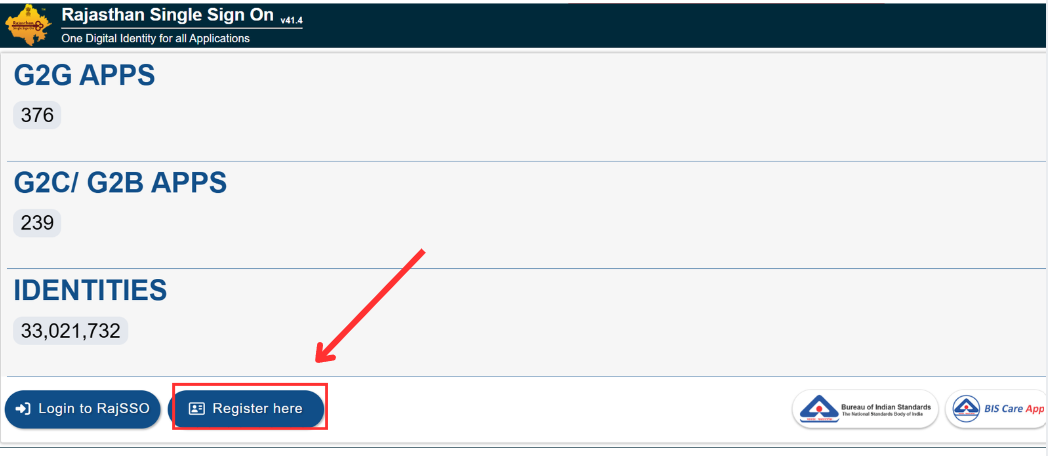
- After clicking on Register Here, you will be proceed to the next registration window as shown in the image below.
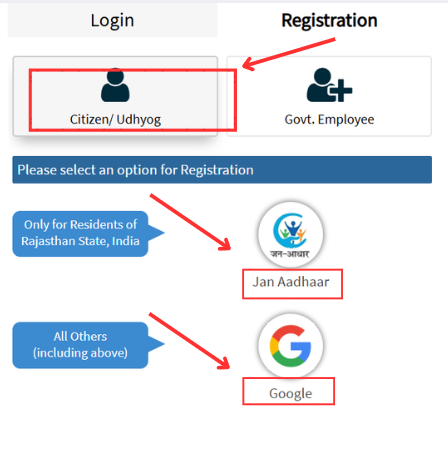
- You will see two options for registration.
- Jan Adhaar and Gmail account are these two options.
- When you will select Jan Adhaar option, you will see a family list.
- Select your name and fill the form carefully.
- Enter your mobile number and click on Verify.
- An OTP will be received and enter the code to verify.
- Now set your password and you will successfully registered for SSO ID.
SSO ID Registration (Government Employees)
If you are a Government Employee then the registration process is bit different. Please follow all process discussed below to create your SSO ID as Gov,t employee easily.
- Visit the official website of SSO Portal http://sso.rajasthan.gov.in/.
- Click on the Registration as Govt. Employee as shown in the image below.
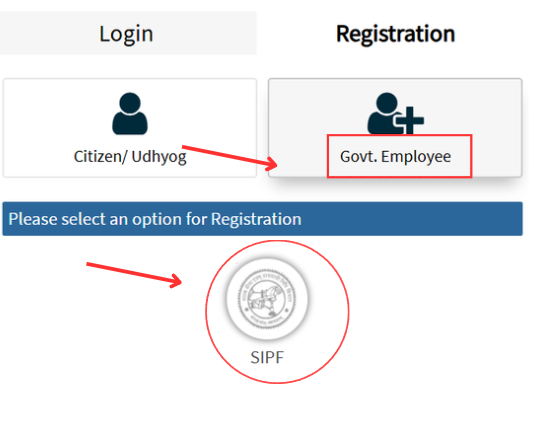
- Now click SIPF (State Insurance & Provident Fund) ID given to all Govt employees.
- You will see an interface which is shown below.
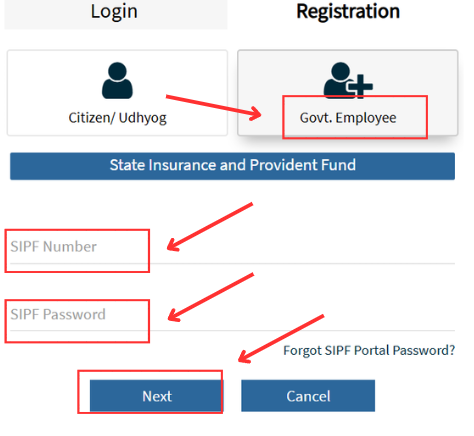
- After filling the informtion, press next button as shown in image above.
- You will receive a confirmation OTP.
- Enter the code to verify.
- Set your password and you will successfully create the SSO ID as a Govt. Employee.